Miscellaneous Typeset Info
M&R Options
Import Interface File Version 2.89
Information
about the SOSET Export Interface File Version 2.89
Mouse Functions
Import File Formats in 16-bits
Import File Formats in 32-bits
Export File Formats in 32-bits
AppleMac Files
ANSI Characters
ASCII Characters
Working with Barcodes
Time Registration
Remake Options
Order Tracking for
Remote Branches and Remote Customers
Inch/Millimeter Conversion
M&R Options
Typeset supports the following M&R options (thus these options are available with Typeset Gold M&R version only):
- Shoulder-support enables SOSET to generate "shoulders" around images/texts of design during printing/sending data to laser-engraver . SOSET uses and adjusts power and speed settings of the M&R laser.
- Multi-laser support enables output to more than one M&R laser engraver. A special Laser-table controls settings for the different laser engravers. You can edit the Laser-table by selecting the Laser command in the Browse submenu in the File menu in NamoSys.
- Large table output controls output for the total size (3x A-4) of the M&R laser-engraver.
- Seal support generates a mirrored copy of the design and places it on the page-layout and/or sends data of both die and counter to laser-engraver.
- One time cutting specifies that during PageWizard output, overlapping cutting-lines are only engraved once.
- Lasercut-path option calculates automatically the (laser-)cutting path around the boundings of a stamp. See Lasercutting Command for more information.
- Extended-Cut-path option calculates automatically the exact cutting path around the boundings of a stamp. See Lasercutting Command for more information.
- Laser settings in browse dialog in NamoSys lets you select Laser settings which offers adjustment of specifications for the M&R laser.
- Jump support skips empty space between stamps (movement with higher speed).
- Trim support engraving starts and ends at beginning of stamps/lines. Movement to beginning of stamps are as minimum as possible. Also, artificial intelligent movement for signs and seals.
- Environmental support does not engrave empty space between stamps (cutting path) during engraving.

Import Interface File Version 2.89
This option is only available in SOSET typeset Plus
All numbers are always positive and with leading zero's
Example
Name of ASCII-file: EXPOR001.SOS (001 up to 999 allowed!), place file in subdirectory drive\DATA\SOSET\IMPORT
%% SOSET-DOS 31.12.99 00:00:00 Copyright NamoSoft BV
[OrderInfo]
12345678,001,001,19991231,
1,123456789012,SEARCH,00,00,00,0,645592,CUSTOMERINFO,1,19991231,SEARCH,2[Props]
1000,10000,0
[OrderInfo]
12345678,001,001,19991231,
1,123456789012,SEARCH,00,00,00,0,645592,CUSTOMERINFO,1,19991231,SEARCH,2
[Props]
1000,10000,0
&END&
End example
FIELD DESCRIPTION:
Intro always:%% SOSET-DOS date time Copyright NamoSoft BV
The properties-info is optional.
| Orderintro | Pos. | Type | Always [OrderInfo] |
| ORDERNO | 8 | Numeric | |
| ORDERITEM | 3 | Numeric | |
| ORDERITEM | 3 | Numeric | always same as previous |
| ENTERDD | 8 | Numeric | YYYYMMDD |
| QUANTITY | 4 | Numeric | |
| PRODCO | 12 | Alpha/numeric | |
| SEARCHKEY | 6 | Alpha/numeric | |
| COLOR | 2 | numeric | |
| STATUS | 2. | numeric | always 00 |
| MOUNT | 2 | numeric | 00=default |
| RUSHCODE | 1 | numeric | 1=rush,2=48 hour rush, 3=24 hour rush, 0=no rush |
| CUSTOMERID | 6 | numeric | |
| CUSTOMERINFO | 25 | alpha/numeric | |
| MISCELLANEOUS | 1 | numeric | always 1 |
| SHIPDD | 8 | numeric | |
| SEARCHKEY 2 | 6 | alpha/numeric | |
| TERMINATOR | 1 | Numeric | always 2 |
| STAMPINFO | always [Props] | ||
| WIDTH | 5 | Numeric | mm-size X 100 |
| HEIGHT | 5 | Numeric | mm-size X 100 |
| SHAPE | 1 | Numeric | 0=normal, 1=circular, 2=oval |
| Epilog | always &END& |
After successful import, the file is automatically moved to subdirectory drive\DATA\SOSET\TEMP\
Information about the SOSET Export Interface File Version 2.89
To enable data exchange between SOSET software and other applications, SOSET automatically writes overview-information to a CSV-type file, every time an overview is printed.
The Export interface file: *.txt (the name of this ASCII-file as entered in the report dialog) has the following fields:
All number always positive and with leading zero's
example:
The header-info describes the field-sequence, below an example of the Ready to ship order
report.
[Title]
SOSET REPORT: Ready to Ship 16.04.97 00:00:00
[Version]
2.9
[Header]
CustID, OrderNo, PartNo, Quantity, ProductID, Colour, BoxNo, Date In, Date Out, RushID
[Data]
123456,12345678,001,1,123456789012,00,100001,19991231,20000131,0
223456,22345678,001,2,H0001,00,100002,19971231,20000131,1
223456,22345678,002,3,P100101,01,100003,19971231,20000131,2
[EndData]
&END&
End example
FIELD DESCRIPTION:
| Line # | Description | Pos. | Type | Contents |
| -7 | intro1 | 8 | ||
| -6 | intro2 | 3 | ||
| -5 | intro3 | 3 | ||
| -4 | intro4 | 8 | ||
| -3 | intro5 | 4 | Numerical | |
| -2 | intro6 | 12 | ||
| -1 | intro7 | 6 | ||
| 0 | intro8 | 2 | ||
| 1 | CUSTOMERID | 6 | Numerical | |
| 1 | ORDERNO | 8 | Numerical | |
| 1 | ORDERITEM | 3 | Numerical | |
| 1 | QUANTITY | 1 | Numerical | |
| 1 | PRODCO | 12 | alpha/numerical | |
| 1 | COLOR | 2 | Numerical | |
| 1 | BOX | 6 | Numerical | |
| 1 | ENTERDD | 8 | Numerical | |
| 1 | SHIPDD | 8 | Numerical | |
| 1 | RUSHCODE | 1 | Numerical | 1=rush, 2=48 hour rush, 3=24 hour rush, 0=no rush |
| LAST-1 | DATA-LABEL | always [EndData] | ||
| LAST | EPILOG | always &END& |
So this file contains the same information and is in the same order as the printed overview.
The CSV (Comma Separated Value) file has a comma between each field and can be easily read into spreadsheets, accounting software, etc.
You can also use several of these files, like the shipment-overview to initiate automatic invoicing in your own OrderEntry software.
Note: You will find the file-name on the overview!
Mouse Functions
Mouse functions for Text segments:
| LEFT | Moves the current position to the mouse position. |
| LEFT DOUBLE | Selects the textblock at the mouse-position. |
| MOVE | Drag selection with left mouse button down |
| SHIFT + LEFT | Supports multiple selection. |
Mouse functions for Graphical objects:
| LEFT | Moves the current position to the mouse position. |
| LEFT DOUBLE | In case the mouse is located on a graphical object this object can be modified. Otherwise an object is added to the list of objects. |
| MOVE | Drags objects. |
| LEFT + MOVE | Selects objects. |
| SHIFT + LEFT | Supports multiple selection. |
| RIGHT | Show a pop-up menu in which you can select the most commonly used function for the selected object. |
Import File Formats in 16-bits
SOSET Typeset supports many import formats. However some rules must be followed to achieve proper logo handling.
- In some logo-scan-applications logos are by default saved with a background and appear in SOSET in the size of the background instead of the size of the logo. Try to change the size of the page to the size of the logo.
- Background coloring also causes problems when more than one logo is used in the same stamp and they must overlap. Turn off the background coloring or change the background coloring into transparent.
- Tests show the best results using logos in the WMF (Windows Metafile) format. You should include the so-called placable header when saving in WMF-format.
Supported File Formats for Typeset 16 bits (version 3.3 and before):
| File type | File Extension |
| Adobe Illustrator/encapsulated Postscript file | EPS or AI |
| Microsoft Windows device independent Bitmap | BMP or DIB |
| CorelDraw 3 drawing file (save as version 2 or 3) | CDR |
| Computer Graphics Metafile | CGM |
| Clear Text Computer Graphics Metafile | CTM |
| Harvard Graphics 3.0 drawing file | CH3 or SY3 |
| Micrografx drawing file | DRW |
| AutoCAD drawing interchange file | DXF |
| Digital Research graphics file | GEM |
| Compuserve graphics interchange format file | GIF |
| Hewlett-Packard Graphics Language file | HGL |
| Joint Photographic Experts Group bitmap | JPG |
| OS/2PM metafile | MET |
| NAPLPS graphics file | NAP or PDI or PIC |
| Kodak photo CD bitmap | PCD |
| Macintosh Quickdraw file | PCT |
| Lotus 1-2-3 graphics file | PIC |
| AutoShade rendering file | RND |
| Zsoft PC Paintbrush bitmap | PCX |
| SOSET Typeset stamp-design | SOS |
| Truevision TARGA file | TGA |
| Tagged Image File Format | TIF |
| Microsoft Windows Metafile | WMF |
| Wordperfect graphic file | WPG |
Note: The SOSET Silver version only supports the image/logo import of .TIF, .CDR, .EPS, .WMF, AI. files.
Import File Formats in 32-bits
IMPORT FILE FORMATS IN SOSET TYPESET 32-BITS VERSION 4.00 and above:
The image options starting SOSET TYPESET 32-BITS VERSION 4.00 have been dramatically
changed and exchanged with a more reliable and modern library. Unfortunately some of the formats are not available, due to license-regulations.
We also recommend to use the OLE-options to link 3rd party application-designs to a SOSET
typeset stamp.
Below you will find an overview of all new import and export formats:
Note: Not all options might have been implemented yet, please contact our support department for a current status.
Import filters
| File Format | SOSET 16-bits | SOSET 32-bits |
| BMP - Microsoft Windows DIB | Supported | Supported |
| DIB - Microsoft Windows | Supported | Supported |
| DIB - Microsoft Windows | Supported | Supported |
| EPS - Encapsulated Postscript File | Supported | Supported |
| GIF - Graphics Interchange Format | Supported | Supported |
| PCD - Kodak Photo CD Bitmap | Supported | Supported |
| PCX - Zsoft PC Paintbrush Bitmap | Supported | Supported |
| TIF - Tag Image File Format | Supported | Supported |
| WMF - Microsoft Windows Metafile | Supported | Supported |
| WPG – WordPerfect Graphic File Format | Supported | Supported |
| AVI | Not supported | Supported |
| Windows Fax (AWD) | Not supported | Supported |
| CALS raster file | Not supported | Supported |
| JPEG | Not supported | Supported |
| LEAD CMP | Not supported | Supported |
| DICOM | Not supported | Supported |
| Raw FAX | Not supported | Supported |
| IOCA | Not supported | Supported |
| GEM Image | Not supported | Supported |
| Lead 1-Bit | Not supported | Supported |
| MacPaint | Not supported | Supported |
| MacPict | Not supported | Supported |
| Portabel Netword Graphics | Not supported | Supported |
| Adobe Photoshop 3.0 | Not supported | Supported |
| Sun Raster | Not supported | Supported |
| TARGA | Not supported | Supported |
| CCITT | Not supported | Supported |
| WinFax | Not supported | Supported |
| Kodak FlaxhPix only on 32 bits system | Not supported | Supported |
| Windows Icon | Not supported | Supported |
| Windows Cursor | Not supported | Supported |
| Microsoft Paint | Not supported | Supported |
| AI - Adobe Illustrator File | Supported | Not supported |
| TIFF LZW compression | Not supported | Not supported |
| CDR - Corel Draw Graphics Metafile | Supported | Not supported |
| CGM - Computer Graphics Metafile | Supported | Not supported |
| CHT - Harvard Graphics 3.3 Chart File | Supported | Not supported |
| CH3 - Harvard Graphics 3.0 Chart File | Supported | Not supported |
| CTM - Clear Text CGM | Supported | Not supported |
| DRW - Micrografx Drawing File Format | Supported | Not supported |
| DXF - AutoCAD Drawing Interchange File Format | Supported | Not supported |
| GEM - Digital Research GEM Format | Supported | Not supported |
| HGL - Hewlett Packard Graphics Language | Supported | Not supported |
| JPG - Joint Photographic Group Format | Supported | Not supported |
| MET - OS/2 PM Metafile | Supported | Not supported |
| NAP - NAPLPS - Standard ANSI | Supported | Not supported |
| PDI - NAPLPS - IBM PC Videotex | Supported | Not supported |
| PIC - Lotus 123 Picture File Format | Supported | Not supported |
| PIC - NAPLPS - General Parametrics | Supported | Not supported |
| PCT - Macintosh PICT Format | Supported | Not supported |
| RND - AutoShade Rendering File Format | Supported | Not supported |
| SYM - Harvard Graphics 2.3 Symbol File | Supported | Not supported |
| SY3 - Harvard Graphics 3.0 Symbol File | Supported | Not supported |
| TGA - Truevision Targa File Format | Supported | Not supported |
Export File Formats in 32-bits
| File Format | SOSET 16-bits | SOSET 32-bits |
| BMP – Microsoft Windows DIB | Supported | supported |
| EPS – Encapsulated Postscript File | Supported | Supported |
| GIF – Graphics Interchange Format | Supported | Supported |
| PCX – Zsoft PC Paintbrush Bitmap | Supported | Supported |
| TIF – Tag Image File Format | Supported | Supported |
| WMF – Microsoft Windows Metafile | Supported | Supported |
| Ami Pro | Not supported | Supported |
| ASCII | Not supported | Supported |
| dBaseIV | Not supported | Supported |
| DCA/RFT | Not supported | Supported |
| Excel | Not supported | Supported |
| PostScript | Not supported | Supported |
| Word for Windows/ RTF | Not supported | Supported |
| HTML | Not supported | Supported |
| AI - Adobe Illustrator File | Supported | Not supported |
| CGM – Computer Graphics Metafile | Supported | Not supported |
| CTM – Clear Text CGM | Supported | Not supported |
| DXF – AutoCad Drawing Interchange File Format | Supported | Not supported |
| DRW – Micrografx Drawing File Format | Supported | Not supported |
| GEM – Digital Research GEM Format | Supported | Not supported |
| HG3 – Havard Graphics File Format | Supported | Not supported |
| MET – OS/2 PM Metafile | Supported | Not supported |
| NAP – NAPLPS (nap, pdi, pic) | Supported | Not supported |
| PCT – Macintosh PICT Format | Supported | Not supported |
| TGA – Truevision Targa File Format | Supported | Not supported |
| WPG – WordPerfect Graphic File Format | Supported | Not supported |
AppleMac Files
AppleMac * PCT files are only readable when saved in Windows format!
ANSI Characters
To access these characters, hold down the ALT-key and use the numeric keypad to type a zero followed by the ANSI character code.
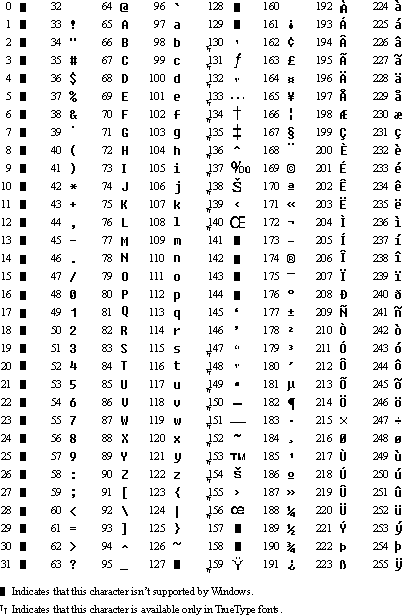
Note: &127 indicates that this character is not supported by Windows.
ASCII Characters
To access these ASCII characters, hold down the ALT-key and use the numeric keypad to type the ASCII character code.
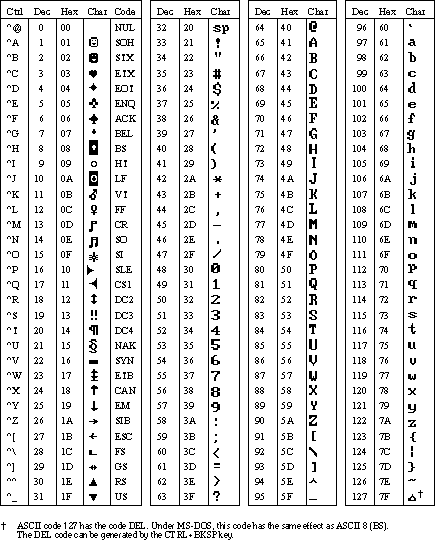
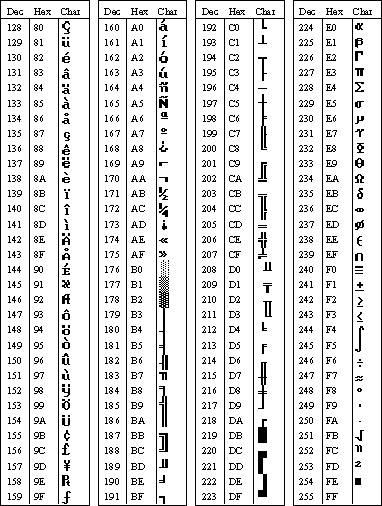
Note: You also can use the Character map in Windows accessories
Working with Barcodes
The SOSET Typeset software includes helpful shipping and invoicing procedures.
For shipping and handling procedures, you can use the bar-coded notes instead of the shipping-lists provided by SOSET.
If you use the bar-coded notes we advise you to store products which are ready to ship in boxes. You will need 50-250 boxes. These boxes must be labeled with the numbered barcodes. These labels are included in your software package. In case you need new/more barcode labels, select the Print barcode labels command from the File menu in NamoSys. Enter the range of barcode numbers you want to print.
Barcodes facilitate storage and retrieval. You label the orders/stamps by assigning a barcode to them. Each order has its own barcode. This enables tracking your order during the entire production process. Simply print the run-cards and keep them with the corresponding bar-coded box. When a stamp is produced and Ready for shipment, you scan the bar-code on the run-card and on the bar-coded box. It is not until all order-items/stamps are In box and Ready for shipment, that the order automatically reads Shipped.
Time Registration
Every time you start to enter or edit a new or previously entered stamp, SOSET registers the time during entry and update of the design.
Use the query-option in the Overviews menu in NamoSys to get totals and averages on entry and edit time per user. Based on this information you can make a full report of any user's activities.
Remake Options
Very often you want to know the reason for a remake. Sometimes it is even essential to know the reason.
If you change the typeset status of a stamp into Remake, SOSET will
treat this stamp as a newly entered stamp.
Therefore this stamp will appear on the next output of all newly entered stamps. The
remake reason will be printed on the output to inform the corrector what must be
checked to do a perfect remake.
Also, this option enables you to give the customer the correct information in case a stamp is too late because it has to be remade.
On screen this information is available with the General Information command in the Properties menu. The status information is stored in the stamp history.
You change the Typeset status into Remake by double-clicking this option or by pressing the Enter-key once. Subsequently SOSET comes with a dialog, which prompts you to select the remake-reason.
The Remake Types are:
00 Unknown 01 Everything wrong 02 Lost 03 Production 04 Quality die 05 Quality mount 06 Quality dirty 07 Misspelled 08 Bad copy 09 Wrong cutting 10 Wrong quantity 11 Wrong size 12 Wrong color 13 Wrong productUse the query-options in the NamoSys program to generate a printed list with remake information.
This options is only available in the SOSET Typeset Gold version!
Order Tracking for Remote Branches and Remote Customers
You can specify users in the user-table with the Browse command in the File menu in Namosys
SOSET considers a remote customer as any SOSET user with the only difference that the remote user is recognized by the customer-ID field of the user-table.
During log-in SOSET checks the pin-code of a user.
The user must also enter a customer-ID even when the customer-ID field is filled with a customer-ID. In this way you can permit remote customers to log-on to YOUR system (by remote modem operation), enabling them to search for (only their own) stamps.
Use this possibility as a special and modern service to your customers.
Inch/Millimeter Conversion
| Fraction | Inches | Millimeter | Fractions | Inches | Millimeters |
| 1/64 | .0156 | 0.396 | 33/64 | .5156 | 13.096 |
| 1/32 | .0312 | 0.793 | 17/32 | .5312 | 13.493 |
| 3/64 | .0468 | 1.190 | 35/64 | .5468 | 13.890 |
| 1/16 | .0625 | 1.587 | 9/16 | .5625 | 14.287 |
| 5/64 | .0781 | 1.984 | 37/64 | .5781 | 14.684 |
| 3/32 | .0937 | 2.381 | 19/32 | .5937 | 15.081 |
| 7/64 | .1093 | 2.778 | 39/64 | .6093 | 15.478 |
| 1/8 | .125 | 3.175 | 5/8 | .6250 | 15.875 |
| 9/64 | .1406 | 3.571 | 41/64 | .6406 | 16.271 |
| 5/32 | .1562 | 3.968 | 21/32 | .6562 | 16.668 |
| 11/64 | .1718 | 4.365 | 43/64 | .6718 | 17.065 |
| 3/16 | .1875 | 4.762 | 11/16 | .6875 | 17.462 |
| 13/64 | .2031 | 5.159 | 45/64 | .7031 | 17.859 |
| 7/32 | .2187 | 5.556 | 23/32 | .7187 | 18.256 |
| 15/64 | .2343 | 5.953 | 47/64 | .7343 | 18.653 |
| 1/4 | .2500 | 6.350 | 3/4 | .7500 | 19.050 |
| 17/64 | .2656 | 6.746 | 49/64 | .7656 | 19.446 |
| 9/32 | .2812 | 7.143 | 25/32 | .7812 | 19.843 |
| 19/64 | .2968 | 7.540 | 51/64 | .7968 | 20.240 |
| 5/16 | .3125 | 7.937 | 13/16 | .8125 | 20.637 |
| 21/64 | .3281 | 8.334 | 53/64 | .8281 | 21.034 |
| 11/32 | .3437 | 8.731 | 27/32 | .8437 | 21.431 |
| 23/64 | .3593 | 9.128 | 55/64 | .8593 | 21.828 |
| 3/8 | .3750 | 9.525 | 7/8 | .8750 | 22.225 |
| 25/64 | .3906 | 9.921 | 57/64 | .8906 | 22.621 |
| 13/32 | .4062 | 10.318 | 29/32 | .9062 | 23.018 |
| 27/64 | .4218 | 10.715 | 59/64 | .9218 | 23.415 |
| 7/16 | .4375 | 11.112 | 15/16 | .9375 | 23.812 |
| 29/64 | .4531 | 11.509 | 61/64 | .9531 | 24.209 |
| 15/32 | .4687 | 11.906 | 31/32 | .9687 | 24.606 |
| 31/64 | .4743 | 12.303 | 63/64 | .9843 | 25.003 |
| 1/2 | .5000 | 12.700 | 1 | 1.000 | 25.400 |
Contact us in case you have any question or comment via our email