SOSET Help contents
Typeset Status
All stamps entered via SOSET Typeset in the database are controlled by a Typeset status. There are about 25 different status-options. Some of these options are automatically set during several operations. Other status-options have to be changed manually.
All status-options can be changed with the Status command in the Properties menu to change the status of only the current stamp or with the Change Status command in the File Menu to change the status of one or more stamps.
The Typeset Status Overview:
| Status | Description | |
| 0 | Entry | During entry or edit, the status is Entry to avoid printing during editing. |
| 1 | Entered | After entry the status becomes Entered. The stamp is now available for the next Entered-stamp-run in the PageWizard. |
| 2 | Proofreading | After printing entered stamps in PageWizard, SOSET automatically changes the status of the stamp into Proofreading. |
| 3 | Corrected | This status is set by operator after proofreading. The Corrected status will set the stamp available for next production printrun. |
| 4 | Delayed | To delay stamp for later production. Selection of Delayed stamps is available during printruns in PageWizard. |
| 5 | Not delayed | To undo the delayed status choose Not-delayed. |
| 6 | Deleted | Stamp is marked for deletion. This means it will be Deleted during next system-check. |
| 7 | In production | Stamp is In production. Status is automatically set when corrected run is performed. |
| 8 | Too long | Stamp is Too long and needs to be revised by customer. |
| 9 | In Box | Stamp is produced and ready for next shipment. Only if all stamps-/order-items are In box the status will be automatically changed into Ready to ship. |
| 10 | Proof/Embargo | To put the stamp on hold for later production. |
| 11 | Ready to ship | This stamp is Ready to ship. Only if all stamps-/order-items are in boxes the status is changed into ready to ship. |
| 12 | Shipped | This stamp is Shipped. |
| 13 | Ready to modem | A stamp with this status is ready to modem, during a modem session. See also: the Modem menu in NamoSys to transfer files by modem. |
| 14 | SOSET-DOS Import | Status set after import of SOSET-type DOS files. |
| 15 | Processing | During printing and other operation, SOSET changes the status into Processing. The stamp cannot be edited. |
| 16 | Remake | At any moment during production anyone can change the status into Remake. The
stamp will be on the next printrun for proofreading as any newly entered stamp. The remake
type can be registered. In case the order has the status Ready to ship, the remake status will automatically change the status of all other parts of the same order back into In box. |
| 17 | Template | Select this option to save a design for duplication. A record/stamp with Template status can not be edited. |
| 18 | Labels | In PageWizard you can automatically create Labels for your stamps. The label information/design is stored in a stamp. |
| 19 | Partly in box | In case quantity is more than 1 and not all stamps are produced/ in box/ready to ship, choose Partly in box. |
| 20 | Quotation | A quotation has been submitted, but awaits a reply. |
| 21 | Purchased | Order-items have been purchased, but are not yet available |
| 22 | Hold for answer | The order is held until customer's approval. |
| 23 | Not in stock | The products for this order are not in stock, and therefore have to be ordered. |
| 24 | Hold for proof | The stamp is held for later production, after the proof print is approved of. |
| 25 | Credit hold | The stamp is held for production until the customer has proven his credibility. |
| 26 | Quick Export | This stamp is entered in Quick Typeset. When this stamp is exported to Typeset, the status in the Quick Typeset will change to in production. |
Note: The status of stamps in PageWizard procedures can not be changed, the change status procedure will warn, that in this case the status is NOT changed. Status change can be much more efficient and accurate if you use a (guntype) bar-code scanner.
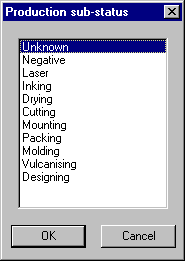
When set in the Global Preferences the following sub-status options become available when a stamp gets the In Production status:

Contact us in case you have any question or comment via our email